
Where to Keep Bitcoin
To get a feeling for the importance of where your Bitcoin is held, let’s start with a familiar example.
How Banks Hold Your Money

Imagine you live in a European country and have an account at a large bank. In your account are 10,000 Euros. Does the bank actually keep those 10,000 Euros in notes in a little drawer somewhere? Of course not. Your money is simply an entry in a computer database.
Because of the way that all banks operate called ‘fractional reserve banking’, your bank doesn’t hold – even in digital form as a database entry – all of the deposits of all of its customers. This means that if there is a bank run, and all the bank’s customers turn up simultaneously at the door asking for their money, there is no way the bank can pay everyone. They only have a small fraction of customer deposits.
Now, instead of putting those 10,000 Euros into a bank account, if you put them in physical form as notes under your mattress or in a safe at home, you would still have full access to all of your money, even in a bank run scenario. This is the advantage of having your money in your own possession and not trusting a third party.
Are you the Custodian of Your Own Bitcoin?

As in the example above, you can either entrust your Bitcoin to a third party – like an exchange or an ETF provider – or you can take it into your own possession. Only when it’s in your own possession do you have 100% control over your Bitcoin.
Now we need to explain some common Bitcoin jargon: custody, custodial, custodian, etc.
The concept of whether Bitcoin is in your own ‘custody’ or not comes up a lot in Bitcoin conversations. If you are the custodian of your Bitcoin it means you – and only you – have the private key that can move your Bitcoin around.
If someone else holds the private key to your Bitcoin, like an exchange, then they are the custodians of your Bitcoin. If the exchange suddenly went rogue, or got hacked, your Bitcoin could disappear into thin air.
The popular expression warning you not to trust a third party and to take control of your own key is: ‘Not your Keys, not your Bitcoin’.
Bitcoin Wallets
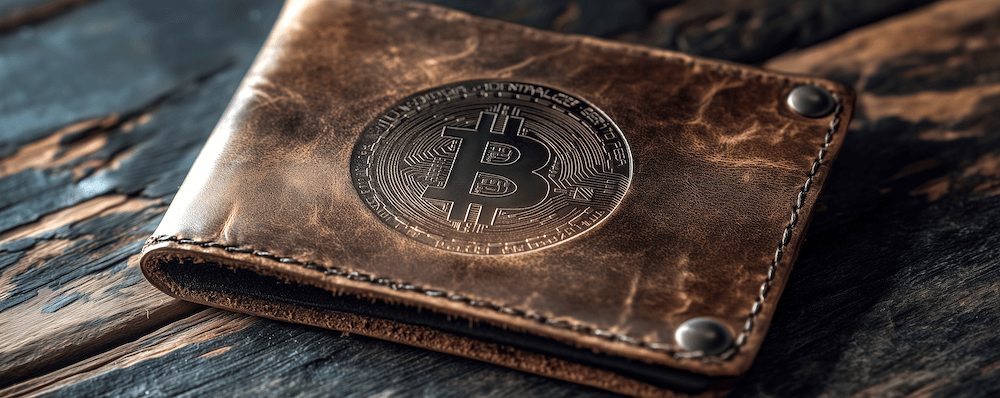
In the Bitcoin world, the equivalent of keeping your cash under your mattress – actually it’s much more secure than that – is to move your Bitcoin to a ‘wallet’.
So, what is a Bitcoin wallet? Actually, it’s a bit of a misnomer. If you’ve read our page on How Does Bitcoin Work?, you’ll know that Bitcoin is kept in a permanent online ledger known as a blockchain.
A Bitcoin wallet does not therefore contain your Bitcoin. Instead, it contains your top-secret private key. You use this key to approve, or sign, a Bitcoin transaction. No-one can ever send your Bitcoin anywhere if they don’t have access to your private key.
Having a Bitcoin wallet, containing the private key that controls your Bitcoin, means your Bitcoin is safer than on an exchange, but that – crucially – you are now responsible for your Bitcoin. Knowing how to hold and protect your Bitcoin private key via a wallet is of utmost importance.
Seed Phrases

Now, when you first set up a Bitcoin wallet, you will need to write down a recovery ‘seed phrase’. This is usually a list of 12 or 24 words. Some wallets use 12 words, others 24 words, and some let you choose. You must write the words down in the correct order, numbered 1-12 or 1-24.
Here are examples of words you might find in a Bitcoin seed phrase:
| 12-Word Bitcoin Seed Phrase | 24-Word Bitcoin Seed Phrase |
|---|---|
| 1. service 2. useful 3. wheat 4. rare 5. person 6. pass 7. innocent 8. brand 9. aspect 10. zoo 11. vendor 12. potato | 1. water 2. seminar 3. pattern 4. ghost 5. hover 6. column 7. erode 8. asset 9. boring 10. transfer 11. yellow 12. indicate 13. north 14. garbage 15. earth 16. convince 17. away 18. fork 19. sentence 20. double 21. speak 22. cousin 23. fancy 24. alien |
Please note: Your seed phrase is vitally important!
It needs to be written down accurately and stored somewhere very safe. Never type it into a computer or anything online. Never take a photo of it. It’s such an important set of words that some people stamp the words into a steel or titanium plate that can withstand water and fire damage.
What’s the big fuss about your seed phrase? Basically, your wallet’s seed phrase is a representation of its private key.
A private key actually looks something like this:
1ad8cf12c08efb60ac60fc4676adad4da8206943a64d00010ab250464723549f
With those 12 or 24 words, in the correct order, you can recreate your private key. Why would you want to do that? It would be in the case of your wallet not working any more or if you wanted to change to a different wallet.
Don’t let anyone find your recovery seed phrase words. If they do, they can input them into a new wallet and steal your Bitcoin!
Being a custodian of your Bitcoin key and seed phrase means you are in total control of your Bitcoin, but it does come with responsibility. If you think you might lose your seed phrase or wallet, it might be best to leave your Bitcoin on an exchange and let them deal with it.
Hardware Wallets
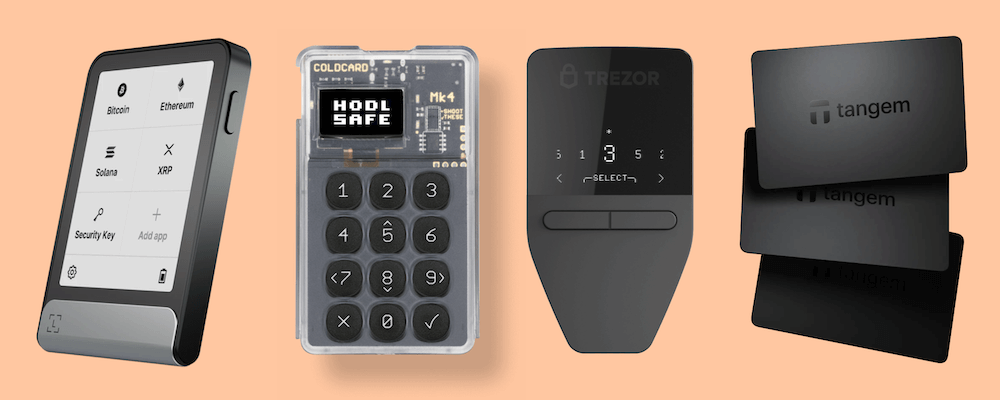
To complicate matters further – who said Bitcoin was easy? – there are many different types of Bitcoin wallet.
The most secure kind are hardware wallets. These are physical devices, usually quite small, that you can hold in the palm of your hand. Your private Bitcoin key is located inside the hardware wallet in a microchip.
Hardware-based Bitcoin wallets are also known as ‘cold wallets’ or ‘cold storage’. It’s like putting your beef into the freezer. It’s tucked away, nice and secure. It’s practically impossible to hack an offline hardware wallet.
However, to use a hardware wallet in order to sign a Bitcoin transaction, you do need to get out your physical wallet and connect it to – or communicate with – another device or piece of software to allow the transaction to go ahead.
To simplify this Bitcoin transaction signing process, most hardware wallets have corresponding software written by the wallet manufacturer. You download this software onto your computer, tablet or smartphone, connect your wallet, and then the software acts as a platform to send and receive your Bitcoin, accessing the private key when it needs do.
Here is a list of some of the main hardware wallet manufacturers and models. Some of these wallets are Bitcoin only; most can hold both Bitcoin and other cryptocurrencies:
| Brand | Model | Seedless? | Own software? |
|---|---|---|---|
| Coldcard | Q | No | No |
| Coldcard | Mk4 | No | No |
| Trezor | Safe 5 | No | Trezor Suite |
| Trezor | Safe 3 | No | Trezor Suite |
| Trezor | Model One | No | Trezor Suite |
| Ledger | Stax | No | Ledger Live |
| Ledger | Flex | No | Ledger Live |
| Ledger | Nano X | No | Ledger Live |
| Ledger | Nano S Plus | No | Ledger Live |
| Blockstream | Jade Plus | No | Blockstream Green |
| Blockstream | Jade Classic | No | Blockstream Green |
| Foundation Devices | Passport Prime | No | Envoy |
| Foundation Devices | Passport Core | No | Envoy |
| Shift Crypto | BitBox02 | No | BitBoxApp |
| Ngrave | Zero | No | Liquid |
| Ellipal | Titan 2.0 | No | Ellipal App |
| Ellipal | Titan Mini | No | Ellipal App |
| Ellipal | X Card | No | Ellipal App |
| Block | Bitkey | Yes | Bitkey App |
| Tangem | Wallet | Yes | Tangem App |
| Tangem | Ring | Yes | Tangem App |
| Cypherock | X1 | Yes | cySync App |
| Real | BC Vault | Yes | BC Vault App |
You’ll notice that Bitkey, Tangem, Cypherock and Real wallets are described as ‘seedless’. This means you don’t have to write down your seed phrase.
The private key is held securely inside the wallet and it’s impossible for anyone – including you – to access it.
You have to be ultra-careful in taking care of seedless wallets. If you lose them, there is no recovery seed phrase to fall back on to recover your Bitcoin.
Bitkey has its own unique solution to being seedless. There are three keys: A Mobile key stored on your phone; a Hardware key stored in the Bitkey device itself; and a Server key securely managed by Bitkey. Transactions made with your Bitkey require two of the three keys to authenticate them. You always control two of the keys – Mobile and Hardware – which means you retain full control of your funds at all times. It’s genuinely hard to lose your funds with Bitkey – they have a pretty much bullet-proof recovery system.
One of the manufacturers, Coldcard, doesn’t have its own desktop or smartphone app. This may seem odd, but it’s actually a security feature. To interact with the Coldcard, you download an app from an independent developer. Some of these apps bring excellent security and privacy features. Here are two good ones:
Software Wallets
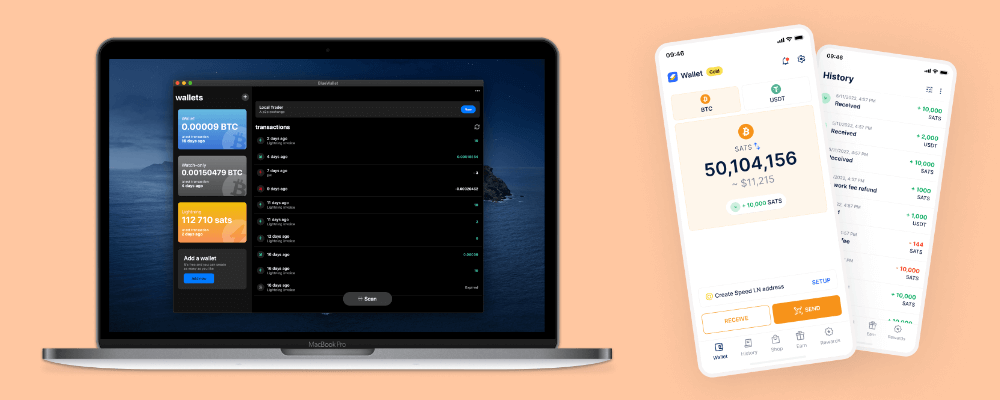
Instead of a hardware-based wallet to hold your private key, you can also have a software-based wallet. These are sometimes referred to as ‘hot wallets’.
There is a massive variety of software wallets, each with its own particular set of features. And new wallets are appearing all the time.
They generally fall into three main categories:
- Desktop wallets – these are dedicated programmes that run on your computer.
- Web wallets – these are accessed via a web browser on your computer, usually as an extension.
- Mobile wallets – they run as apps on your smartphone.
These software hot wallets are seen as less secure than a hardware cold wallet. This is because the device the software is running on – your computer, phone or tablet – is nearly always connected to the internet. Being connected to the internet makes it more susceptible to hacking.
If you have a meaningful amount of Bitcoin, best practice is to control most of it via a private key on a hardware wallet. You can then keep a smaller amount of Bitcoin in a convenient hot wallet for more regular transactions.
Here are a few, popular software-based wallets that run as apps on your phone and allow you to make Bitcoin payments over the Lightning network (see the next page How to Use Bitcoin for an explanation of what Lightning is) wherever you can find stores, restaurants and retail outlets that accept Bitcoin:
| Wallet Name | Lightning? | Non-Custodial? |
|---|---|---|
| Speed | Yes | No |
| Wallet of Satoshi | Yes | No |
| Blink | Yes | No |
| Phoenix | Yes | Yes |
| BlueWallet | Yes | Yes |
| Muun | Yes | Yes |
| Breez Mobile | Yes | Yes |
If the wallet in the table is marked as ‘Non-Custodial Yes’, it means only you know the private key and have to keep it safe.
For wallets marked ‘Non-Custodial No’, the app provider knows and manages your Bitcoin key.
Multi-signature or ‘Multisig’ Wallets
Multisig (multi-signature) wallets are a way of requiring more than one private key to sign / authorise a transaction.
A typical multisig set-up is where you have 3 separate hardware wallets, but only 2 of them are required to approve a Bitcoin transaction. This would be called a 2-of-3 multisig wallet.
Having a multi-signature arrangement to protect Bitcoin is more complex than a single-signature wallet. So why do it? Here are some typical scenarios:
Individuals – If you hold your Bitcoin in a normal single-signature wallet and you lose both your wallet and recovery seed phrase, your Bitcoin is gone forever. You can never get it back. On the other hand, if you had set up 3 hardware wallets – arranged as 2-of-3 multisig – you could still access your Bitcoin using the other 2 wallets.
Companies – If your company owns Bitcoin, you wouldn’t want to give total control over the Bitcoin to any one director. It would be too risky in terms of fraud. Instead, you might entrust the management of the Bitcoin to 3 directors, e.g. the Chairman, Managing Director and Chief Financial Officer. With a 2-of-3 multisig, Bitcoin funds could be moved if 2 of the 3 directors agree. That’s safer than putting control over the funds into the hands of just one person. For even more security, you could create a larger multisig set, for example a 5-of-7 multisig.
Inheritance – What happens to your Bitcoin if you kick the bucket? If your Bitcoin is in a single-sig hardware wallet and no-one knows the pin number, your family will never be able to access the funds. With a multi-sig, other trusted people can have their keys and access your Bitcoin, even if your own wallet remains inaccessible because no-one knows the pin. Obviously, you need to choose those trusted people wisely. Alternatively, you can use a growing number of Bitcoin companies that offer inheritance services, such as:
If you do go down the multisig route, it’s standard practice to keep your wallets in different locations. For example, you might keep one at home, another in a safety deposit box at a bank, and the last one at your best friend’s house.
Multisig is more hassle, as you can only send Bitcoin if 2 of the 3 keys sign the transaction, assuming a 2-of-3 multisig. So, in the example in the paragraph above you would need to get your friend to access his wallet and follow a few steps every time you want to send Bitcoin. If your friend was away on holiday, you’d have to go to the bank and get that wallet instead.
Basically, if you’re just starting out and want to get your Bitcoin off the exchange, a normal single-signature hardware wallet should suffice. It’s perfectly fine for small to medium amounts of Bitcoin. Just keep your seed phrase somewhere safe.
If you have a large amount of Bitcoin that you really need to protect, then a multi-signature set-up would make sense.
Summary
- It’s important to understand the implications of where you hold your Bitcoin.
- For convenience, keeping your Bitcoin on an exchange or in at ETF are easy options.
- Taking control of your Bitcoin in a wallet does require some technical know-how, but means you are not relying on a third party.
- Hardware wallets are safer than software wallets.
- Above all, keep your seed phrase safe, private and offline.
- If you have a lot of Bitcoin, or hold Bitcoin as a company, consider multisig.
Useful Resources
> Ben Perrin explains how to use a smartphone Bitcoin wallet that works with Lightning. This is a so-called ‘hot wallet’ for everyday spending – not where you keep your life savings:
> Here Ben teaches you how to set up a cold storage wallet from scratch. ‘Cold wallets’ are where you can hide away larger amounts of Bitcoin for maximum security:
> John from Unchained has 11 excellent tips for keeping your precious Bitcoin safe:
> If you decide to get a hardware-based cold storage wallet – and want to send and receive Bitcoin in a very secure way – consider Sparrow Wallet software which acts as your interface. Here Ben shows you how to set it up:
> Here is a more detailed description of fractional reserve banking: www.investopedia.com/terms/f/fractionalreservebanking.asp
Where to Next?
If you’ve been reading the sections in order, the next page we recommend is How to Use Bitcoin.